|
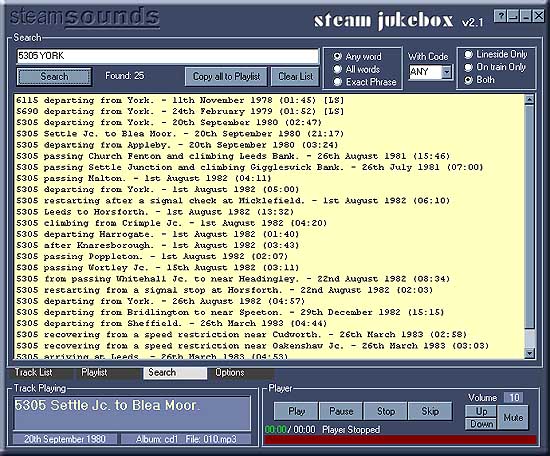
With perhaps a thousand recordings available
in a collection of albums on a DVD it could be difficult to find recordings
of interest without some means of searching. The Search Page allows
you to quickly pick out recordings of specific locomotives, or in specific
places or both. You can specify recordings made from the lineside or
on-train. You can specify recordings made on a particular preserved
line. Once you have found recordings of interest you can play them or
add them to a playlist.
Search
text and options
Search text - This
is where you can enter up to 20 words or numbers to search for.
Each word or number must be separated by a space but be careful not
to include a double space between words or a space will be included
in the search text. As there is a space in every caption you will find
all the recordings available!
You can also search for text to be excluded from a search, just add
a minus sign (-) before the word or number to be excluded. Thus 5305
-York will find all recordings of 5305 that do not have York in the
caption. The excluded text should not be the first item in the search
text and there must be a single space between the words.
Search text is not case sensitive. It does not matter if you enter YORK,
York, york or even YoRk.
All characters in the search text are used with the exception of a single
space between words and the minus sign.
Search button - Starts
the search!
Any, All or Exact
- These radio buttons allow you to specify how the contents of the search
text box are used.
Any Word - If any
of the words or numbers in the search text are present that recording
will be selected. If you enter 5305 York as the search text then any
recordings that have 5305 OR York in the caption will be selected.
All Words - All the
words or numbers in the search text must be present. Again, if you enter
5305 York in the search text both 5305 AND York must be found in the
recording's caption for the recording to be selected.
Exact Phrase - All
the words in the search text must be found in the same order as they
appear. So, if you enter 5305 departing from York in the search text
you will only find recordings of 5305 departing from York!
Any search including an exclusion (-) will automatically become Any
Word.
Lineside, On train or Both - This collection of radio buttons
allows you to refine the search to include only recordings made from
the lineside or recordings made on train. Or you can choose to find
both!
With Code - Each recording
is given a code which identifies where it was made. For example MLS
stands for Main Line Steam, SVR for Severn Valley Railway, and so on.
For a complete list see this
page.
You can use this code in conjunction with search text to find a specific
loco or location on a preserved railway. You can also use it to find
all recordings made on a specific railway. If you select the code SVR
and leave the search text blank all recordings in the current album
made on the Severn Valley Railway will be found. If you leave the code
set to Any you will find all the recordings in the current album!
Clear List - Does
exactly what it says on the button!
Copy all to Playlist
- You can right click on a recording to add just that one to the playlist
but, if you click this button, all the recordings in the search results
will be added to the playlist.
Back to top
Search
Results
Providing your search has found something the result of your search
will be displayed here. You can double click on a recording to play
it or right click to add it to the playlist. You can select multiple
tracks by holding the Control or Shift keys while clicking.
Right clicking will also give you the oppertunity to read notes about
the selected track.
Window
controls
See the Track List page for information about
this area.
Back to top
The
Player
See the Track List page for information about
this area.
Back to top
|